B2B Lead Capture Forms That Convert: Frontend Patterns That Help
Frontend patterns for B2B lead capture forms that convert — field strategy, multi-step flows, validation UX, performance, CRM integrity, and the mistakes that quietly kill demo requests on otherwise solid websites.
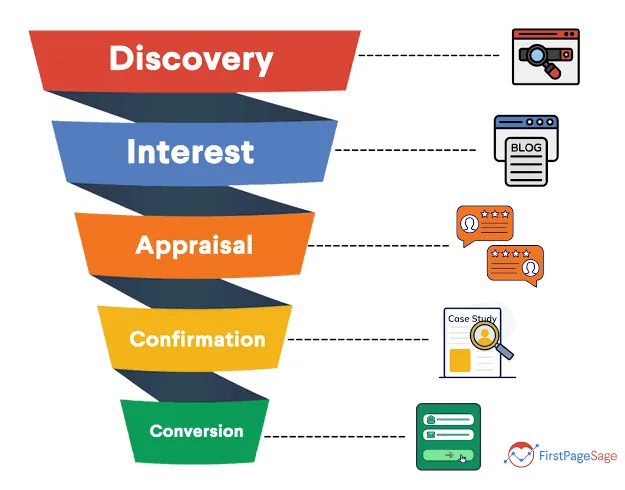
B2B websites rarely lose leads because the brand color is wrong. They lose leads because the demo form is slow, confusing, distrustful, or silently failing into a CRM black hole. I’ve fixed “marketing isn’t generating pipeline” tickets that were actually frontend and integration bugs wearing a strategy costume.
This article focuses on the frontend side of B2B lead capture — the patterns I implement on Astro and Next.js marketing sites for companies that live on demo bookings and contact requests. Broader landing structure lives in Building Landing Pages That Convert; here we zoom into the form itself.
Start From the Sales Process, Not the Design Fad
Before choosing multi-step wizards or minimal email-only fields, ask sales:
- What fields are required to qualify a lead this week?
- What can be enrichened later (Clearbit, manual research)?
- What’s the follow-up SLA after submit?
- Do round-robins or territories depend on any field?
Forms that collect vanity data sales ignores create friction for no revenue.
Field Strategy That Respects Intent
High-intent demo / pricing requests
Fewer fields usually win:
- Work email
- Name
- Company
- Optional: role, company size, use case dropdown
Content gates / webinars
Slightly more forgiveness for extra fields if the asset is strong — still avoid essay questions.
Contact forms on service sites
Message body matters; don’t hide it behind seven qualifying questions that belong on a sales call.
Rule of thumb: every field must justify the conversion drop it will cause.
Multi-Step Forms: When They Help
Multi-step helps when:
- You need progressive qualification without a scary long wall
- Mobile users benefit from chunking
- Later steps can be skipped based on earlier answers
Multi-step hurts when:
- Steps are padding for marketing curiosity
- Progress is unclear
- Back navigation loses data
- Validation only appears at the bitter end
Implementation must preserve answers, show progress, and keep each step fast (INP matters — rage taps on “Next” kill intent).
Validation UX That Feels Respectful
- Validate on blur/submit thoughtfully; don’t scream while typing emails mid-word
- Use human copy (“Work email required”) not browser defaults alone
- Keep error text near the field
- Never clear the whole form after one mistake
- Preserve values across small network retries
Accessible labels and keyboard flows aren’t optional on B2B sites with compliance-conscious buyers — see principles in Creating Accessible User Interfaces.
Performance and Third Parties
Embedding a heavy marketing automation form can undo an otherwise fast Astro page. Options I use:
- Native form posting to a serverless endpoint / Formspree / custom API
- Lightweight client components for validation only
- HubSpot/Marketo embeds loaded on interaction or gated routes — not globally on every page
If paid ads drive to the form URL, put the form in the performance budget conversation with Website Speed Audit for Business Owners.
Trust Furniture Around the Form
Frontend isn’t only inputs:
- Specific CTA copy (“Book a 30-minute demo”) beats “Submit”
- Time-to-response expectation (“We’ll reply within one business day”)
- Privacy link near the button
- Optional social proof adjacent — not a carousel that delays LCP
- Avoid dark-pattern microcopy
Enterprise buyers are allergic to consumer-growth tricks.
CRM Integrity Is Part of Frontend Scope
A form that “works” in the browser but:
- drops fields
- mishandles UTM params
- double-submits
- fails without user-visible error
…is a lead capture failure. Acceptance tests should include CRM record creation with source attribution.
When I ship B2B marketing frontends for clients, CRM mapping and thank-you/event tracking are in definition of done — not “phase 2.”
Thank-You States and Next Steps
After submit:
- Confirm success clearly
- Set calendar/next-step expectations
- Optionally route high-intent users to a booking embed
- Fire analytics events once
Ambiguous success states generate duplicate submissions and support noise.
Case Study: SaaS Demo Form in Dublin
A B2B SaaS team in Dublin was spending meaningfully on Google Ads to a Next.js marketing site. Demo requests looked soft relative to click volume. Sales blamed lead quality; marketing blamed creative. I instrumented the form path and found three frontend problems:
- HubSpot embed loaded on every page via GTM — INP on the CTA was awful on mid-range Android
- Required “phone” and “company size” fields sales never filtered on
- Double-submit on slow networks created duplicate HubSpot contacts and messy round-robin
We replaced the embed on the demo route with a native form posting to a small API route, mapped fields explicitly, preserved UTMs, and moved chat + heatmap tags off the lander. Field set dropped to email, name, company, and optional use-case.
| Change | Outcome (6 weeks) |
|---|---|
| Remove non-essential required fields | +22% relative form start→submit |
| Native form + lighter JS | CTA INP back under budget |
| Idempotent submit + clear thank-you | Duplicate CRM rows nearly gone |
Creative didn’t change. Pipeline mathematics did. For the paid-traffic framing, pair this with Google Ads Landing Pages and Core Web Vitals.
Field Decision Matrix
| Field | Include when… | Skip when… |
|---|---|---|
| Work email | Always for B2B demo | Never skip if CRM identity depends on it |
| Phone | SDRs call within hours | Email-first nurture only |
| Company size | Pricing tiers / routing need it | Sales ignores it in the CRM |
| Budget | Late-stage enterprise motion | Top-of-funnel content offers |
| ”How did you hear about us?” | Brand study with analysis capacity | Vanity — nobody opens the report |
| Free-text message | Service / consulting inbound | Demo booking where calendars follow |
If a stakeholder “just wants” a field, ask which Salesforce/HubSpot report uses it this month. No report → no field.
Progressive Profiling Without Annoying Buyers
Sometimes you need richer data without a wall of inputs. Patterns that work:
- Short first submit → thank-you asks one optional enrichment question
- Calendar embed after submit for high-intent paths (don’t force calendar before value is clear)
- CRM enrichment (firmographics) instead of asking employees to type headcount
- Role-based follow-up forms inside the product later — not on the first marketing hit
Progressive profiling fails when step two feels like a bait-and-switch or when step one already took a minute on mobile.
Lightweight Implementation Notes
A minimal Astro/Next pattern I use for marketing forms:
// Pseudocode — validate, dedupe, forward, respond
export async function POST({ request }) {
  const body = await request.json();
  if (!isWorkEmail(body.email)) {
    return json({ ok: false, error: "Work email required" }, { status: 400 });
  }
  const key = `${body.email}:${body.landingPage}`;
  if (await seenRecently(key)) {
    return json({ ok: true, deduped: true }); // don't punish the user
  }
  await crm.createLead({ ...body, ...extractUtms(request) });
  return json({ ok: true });
}
Client-side: disable the button after first submit, keep values on error, announce errors to assistive tech. Accessibility isn’t a separate project — see Creating Accessible User Interfaces.
QA Checklist Before You Call the Form “Done”
- Submit success creates the CRM record with expected properties
- UTMs / gclid /msclkid persist when present
- Failure path shows a human error (network / validation)
- Double-click / slow 3G doesn’t create two opportunities
- Keyboard-only completion works
- Mobile zoom / input types are correct (
email,telonly if needed) - Privacy copy + link visible near the CTA
- Thank-you fires analytics once
- Ad lander form stays inside the performance budget
If any box fails, the form is not a lead-capture system — it’s a hope.
Where Forms Fit in the Wider Site
Forms don’t fix weak offers or mismatched ads. They amplify whatever the page already promises. Build the lander structure with Building Landing Pages That Convert, then treat the form as the conversion-critical component with its own acceptance tests. On continuous-shipping teams, form regressions are exactly why a light frontend retainer beats emergency Slack messages after a tag-manager change.
Microcopy Library That Doesn’t Embarrass You
Weak microcopy taxes conversion as hard as extra fields. Patterns I keep in client repos:
| Spot | Prefer | Avoid |
|---|---|---|
| Button | Book a 30-minute demo | Submit / Click here |
| Email error | Enter a work email (no Gmail/Yahoo for demos) | Invalid input |
| Network error | We couldn’t send that — try again. Your answers are still here. | Error 500 |
| Success | Thanks — we’ll reply within one business day. | Success! |
| Privacy | We’ll use this to respond to your request. [Privacy policy] | By submitting you agree to everything forever |
Enterprise buyers notice tone. Consumer dark patterns (“Only 2 spots left!!!”) on a serious B2B lander read as amateur — and they bounce. Build the surrounding page with Building Landing Pages That Convert; keep the form honest.
Attribution Fields Worth Wiring Once
Frontend should pass through, not invent:
utm_source,utm_medium,utm_campaign,utm_content,utm_term- Click IDs when present (
gclid, etc.) - Landing page path + referrer
- Variant / experiment id if you run multiple landers
Store them on the CRM contact/deal. Sales shouldn’t ask “where did this lead come from?” if marketing paid for the click. When ads are the acquisition engine, treat attribution tests as seriously as CWV — see Google Ads Landing Pages and Core Web Vitals.
Mobile-Specific Failure Modes
Most B2B demos are researched on desktop and submitted wherever the buying committee is standing. On phones I still see:
- Sticky chat covering the CTA
inputzoom because font-size < 16px- Multi-step “Next” with 400ms interaction lag
- Legal text so small it fails WCAG and trust
- Country phone fields that fight autofill
Test on a real mid-range Android, not only your iPhone. Accessibility baselines in Creating Accessible User Interfaces prevent a surprising share of “mobile conversion is mysteriously worse” tickets.
When to Bring Marketing Automation Embeds Back
Native forms aren’t religion. Embeds win when:
- Ops already lives inside HubSpot/Marketo workflows you won’t rebuild
- Progressive profiling and smart fields are mature in-platform
- Legal/security prefers vendor-reviewed forms
Then load the embed on the form route, defer until interaction if possible, and still budget its JS against the page. A fast Astro shell with a 400 KB embed is not a fast page. Speed literacy for stakeholders: Website Speed Audit for Business Owners.
Sales + Marketing Alignment Workshop (45 Minutes)
Before I redesign a form, I ask both teams into one call:
- Walk a lead from submit → CRM → first human touch
- Mark each field as route / qualify / enrich-later / vanity
- Agree follow-up SLA copy that marketing can print on the thank-you
- Decide one analytics event name for “qualified form success”
If sales and marketing won’t align for 45 minutes, no amount of frontend polish will fix pipeline politics — but at least you’ll know.
Conclusion
B2B lead capture conversion is a frontend systems problem: field discipline, humane validation, fast interactions, trustworthy framing, and CRM-perfect submissions. Fancy animation on the button won’t save a seven-field form sales never asked for.
If your demo requests are soft and the ads/traffic look fine, let me review your form funnel — form friction usually sits inside broader landing page optimization, form UI often lands with a Figma to code developer, and sluggish submit interactions may need website performance optimization. Often the fix is measured in days — not a full rebrand.
Key Takeaways
- Let sales qualification needs drive fields — not design trends
- Use multi-step only when it reduces fear without adding fluff
- Invest in validation, accessibility, and error recovery
- Keep third-party form embeds out of global performance budgets when possible
- Treat CRM + attribution tests as launch blockers
- Clarify thank-you next steps to prevent duplicate leads
Table of Contents
// related.posts()
Continue Reading_

Tailwind CSS for Marketing Sites: Keep Velocity Without the Mess
How I use Tailwind CSS on marketing sites for clients — design tokens, component boundaries, and guardrails that keep campaign velocity high without turning landing pages into unmaintainable utility soup.
Google Ads Landing Pages and Core Web Vitals: A Frontend Guide
How Core Web Vitals affect Google Ads landing page performance — what advertisers should demand from frontend builds, common CWV killers on paid landers, and how I optimize pages that protect CAC.

Building Landing Pages That Convert
Landing page patterns from real client campaigns—hero structure, CTA placement, social proof, performance, and A/B-ready architecture that drives signups.